Signet — a wax seal struck with the Sowilō rune
Windows desktop app · release signing · self-hosting

Signet

A desktop HUD that automates the last mile of shipping software — the code-signing ceremony. Then it signed its own release build, and survived a five-way attempt to break that signature.

3 daysidea → a working, verified code-signing product (Jul 16–18)
5 / 5adversarial verify lenses — none could refute it
Self-signedthe tool signed its own 22 MB release build

From idea to a code-signing product that signed itself — in three days

Signet signs any application; the standout demonstration is that it signed its own release build and survived a five-way adversarial verification. Named on July 16, that self-signed, verified build was done by July 18. The first working signing engine existed within the opening afternoon — the speed came from holding the architecture and driving the build against it.

What it does

The problem. Signing a release is the fragmented last mile of shipping software. After the build, a developer faces a manual gauntlet — the right signing tool for each artifact type, hardware two-factor, cloud-HSM credentials, RFC-3161 timestamps, signature verification, a provenance record — performed by hand, and differently for every distribution channel. It's slow, easy to get wrong, and disconnected from the otherwise-automated pipeline.

The solution. Signet is a desktop heads-up display for that last mile. Stage bubbles float at the edge of the screen, tracking a build toward production-ready; when it's staged, one Complete & Sign runs the ceremony — pull a fresh one-time code from a YubiKey, sign through the cloud HSM, verify, and write a provenance record — pausing only for the single moment a human is needed: the physical key-touch. Distribution profiles make it channel-aware, because the signing method is a property of the distribution, not the tool.

The value. It produces genuinely production-ready artifacts — a timestamped, trusted-chain Authenticode signature that signtool verify /pa passes with zero errors — from a click and a key-touch. It's self-hosting, and it's engineered to be trusted with a security-critical job: a no-single-point-of-failure key model, crash logging behind a single-instance guard, and hardened handling of the hardware, timing, and platform edge cases that make real-world signing brittle.

stack: Python · PySide6 (Qt) · SSL.com eSigner (CodeSignTool / eSigner KSP) · Windows signtool · YubiKey OATH-TOTP · Windows DPAPI · Authenticode + RFC-3161 · packaged with Nuitka.

See it in action

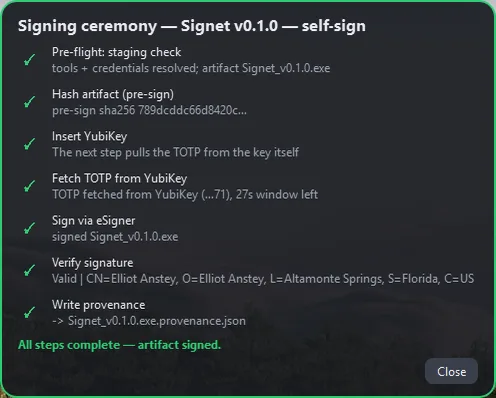
screenshot Signet's signing ceremony completing — every step checked green, ending in a valid Authenticode signature
Signet signing its own release build. Each step verifies before the next; the human is needed only for the physical key-touch. It ends in a valid, timestamped Authenticode signature — this is the tool signing the very build it runs from.
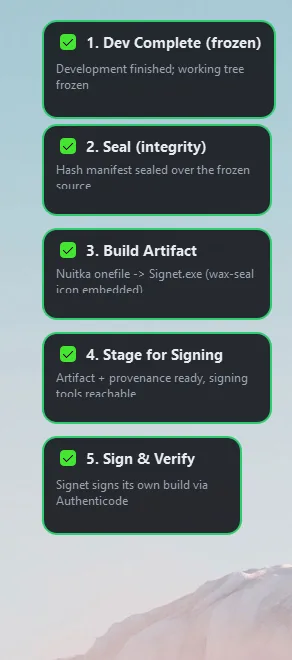
screenshot Five stage bubbles down the screen edge, each checked green
The ceremony as a HUD. Each release stage is its own draggable bubble; they check off as the build advances, and the final one grows the sign button once the rest are green.
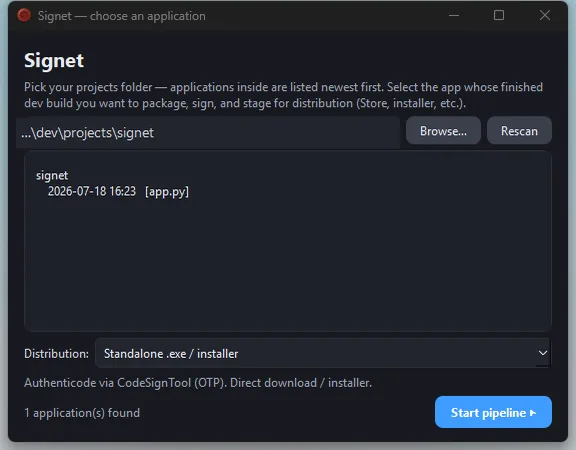
screenshot Signet's launcher with a distribution picker set to Standalone .exe / installer
One tool, every channel. Choosing a distribution sets both the stage sequence and the signing method — a Store submission, a signed sideload package, or a standalone Authenticode download.

The natural next steps

I'd built a tool whose sole purpose is to sign and ready an application for distribution. So the thought that followed was almost inevitable: well — if this thing is going to be official, it's going to have to sign itself. So I pointed it at its own release build and let it run its own ceremony.

The compiled Signet pulled a code from the YubiKey, signed a Signet release through the cloud HSM, verified the result, and wrote its provenance — the tool producing a valid, trusted, timestamped signature on itself.

It's not a gimmick; it's the strongest possible statement of confidence. If the tool can put a genuine, verifiable signature on a 22-megabyte binary, then that binary — itself — is fair game. Signing itself was never the goal — it's the proof the tool works.

Proof: adversarially verified

"It's signed" is a claim. So I tried to break it — five independent checks, each attacking a different failure mode, each told to refute the signature rather than confirm it. Every one held.

Attack angleWhat was attemptedVerdict
Policy verifysigntool verify /pa /v · /all0 errors, 0 warnings
Chain & revocation.NET X509Chain, online revocation, entire chain; root checked in both trust storestrusted, not revoked
Tamper testflip a single byte in a copy — the signature must failrejected · HashMismatch
Timestampsigntool verify /pa /twvalid through 2034
Signer & bytescert thumbprint + subject; file SHA-256 vs the signed provenance recordexact match

The decisive one is the tamper test: flipping a single byte in a copy dropped verification to WinVerifyTrust 0x80096010 / HashMismatch, exactly as it should — proving the passing result on the real file is meaningful, not a tool rubber-stamping whatever it's handed. The signature chains to a publicly-trusted SSL.com root (present in the machine's trusted-root store), carries a valid RFC-3161 timestamp so it survives the signing certificate's 2027 expiry, and the file's bytes match the SHA-256 in its own provenance record. Two independent verification stacks and five adversarial lenses agreed: it holds.

Engineering notes

A few of the real problems solved along the way: